
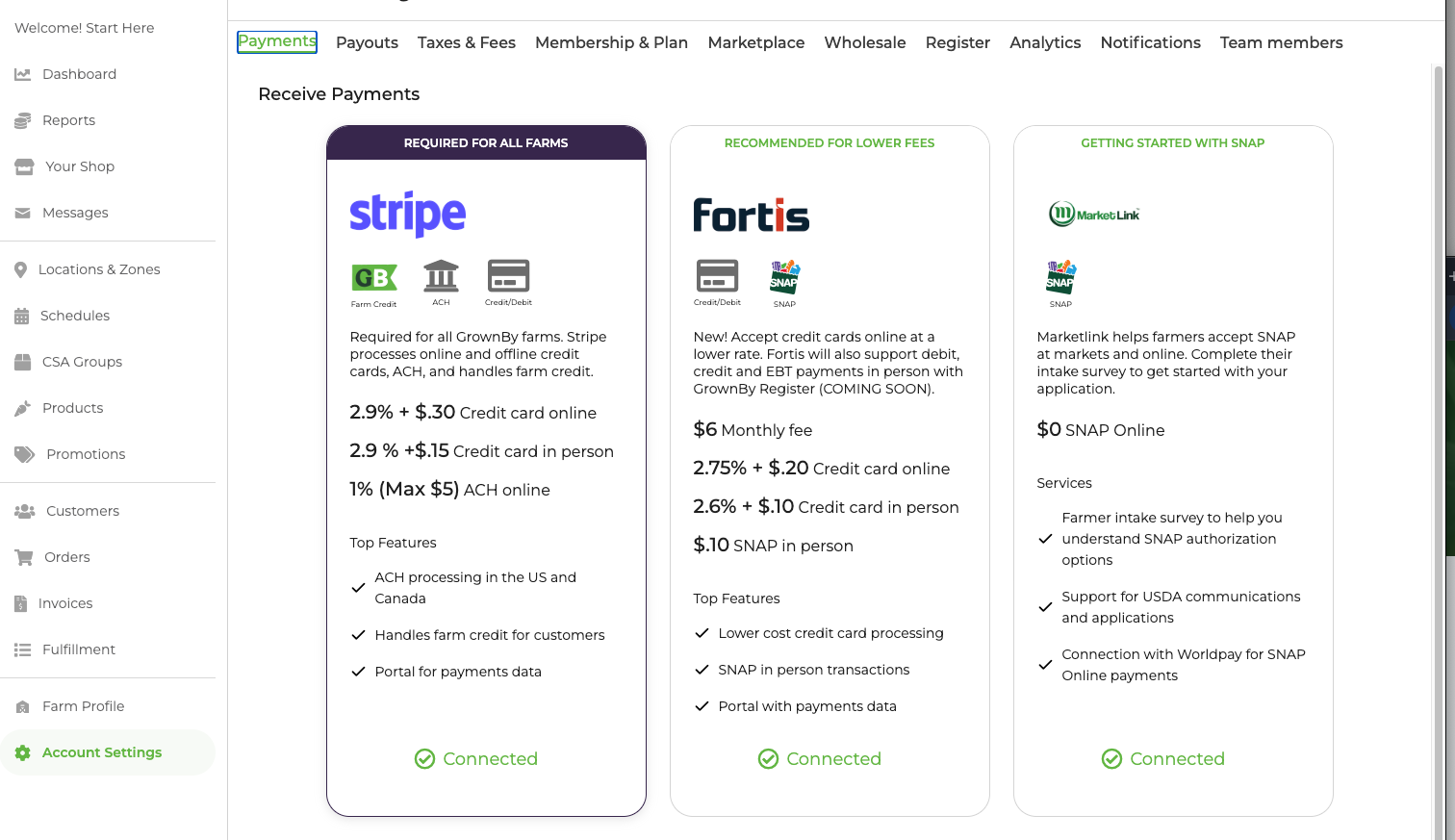
The third step to getting set up in GrownBy is to configure payments. We recommend setting up payments from a desktop device. A connection with Stripe is required for all GrownBy accounts because Stripe processes ACH payments and manages the farm credit system.
You can find your Account Settings page at the bottom of the left hand menu. Select Payments, the first tab.
Here's a video to walk you through the steps:
Payment Processors
Stripe Setup (Required)
GrownBy partners with Stripe for processing credit card payments. You should set up your Stripe account on desktop.
What you'll need to verify your business Stripe:
- EIN
- Bank account number (routing number and account number) for payouts
- Your address
- Your phone number
- Information on company owners, if applicable
- Perhaps other details, depending on business structure
Suggestions:
- Statement description (short and long): we recommend adding your farm's name
Fortis (Optional Add-On)
As of 2026, GrownBy is offering farms a connection to Fortis for more affordable credit card processing. Fortis can also process SNAP/EBT payments (COMING SOON for GrownBy Register EBT).
Stripe vs. Fortis: Which should you use?
- All farms must maintain an active Stripe connection for ACH payments (optional) and farm credit functionality
Pricing considerations:
To add Fortis to your account: After you've set up Stripe, simply follow the Fortis onboarding link and complete the required forms. Once you're set up in Fortis, GrownBy will automatically process your credit card payments through Fortis at the advertised rates, while your Stripe connection remains active for ACH and farm credit.
SNAP Online
Thanks to a partnership with MarketLink and USDA, farmers are able to use GrownBy to process SNAP payments online. Follow the steps in this article to accept SNAP online.
Additional Options
ACH Payments
GrownBy allows your farm to accept ACH (direct bank transfer payments). This payment method is great because it is secure, less expensive in fees, and easy to use. Once it's set-up, the connection remains active unless the shopper closes their bank account or deletes the payment method.
ACH fees are 1% of the sale, capped at $5 (plus $0.30 per transaction in Canada). There is also a $1.50 fee for each new ACH customer who signs up.
There is more about ACH payment for Shoppers here.
And more about ACH payment for Farmers here.
Offline Payments
GrownBy supports offline payments. This feature is useful for customers who pay by check, check or other means.
To enable offline payments, click the box and add a custom message for customers. This message should include details like where to send their check or how to pay with cash at market. These messages are visible during your customer's checkout.
Read more in the Stripe documentation here.