
How to Enable and Use ACH Payments
GrownBy offers ACH payments for a seamless and cost-effective payment option. Follow the steps below to enable ACH payments and understand the associated fees. ACH payments are processed via Stripe and are available for farms in the US and Canada.
If you are a shopper looking for information about ACH payment, read this article!
Payments and invoicing will work the same way as with credit card payments (though they do take 1-3 days to process) but the cost to you/your shoppers is less. Another benefit of ACH payments is that unlike credit cards, ACH does not expire. Unless the shopper unlinks or closes their bank account, the connection will remain. This means less administrative work for your farm.
ACH Payment Fees
- Co-op Fee: 2% (same as credit card payments)
- ACH transaction Fee: 1% of the transaction amount, up to a maximum of $5 (credit card payments are 2.9% + $0.30 per transaction). Farms in Canada are also charged an additional $0.30 per ACH transaction.
- Setup Fee: A one-time fee of $1.50 for the first ACH payment a shopper makes at your farm
As with credit card fees, customers can cover ACH fees at checkout if you have this feature turned on.
Pending Payments
ACH payments are processing, payments will have a "Pending" tag next to them in your Stripe account:
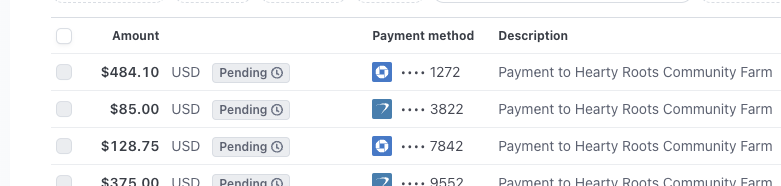
On GrownBy, Pending ACH payments will also appear with the status "Pending (ACH)" in the Invoice page of your dashboard until they have cleared. ACH takes a little longer than a credit card transaction to process, especially for the first transaction. While an ACH payment is listed as "Pending" it can not be voided or cancelled. You will need to wait until the payment as processed.
If an ACH payment fails, Stripe can provide codes that show the reason for the failure which can be helpful when communicating with a customer.
Enabling ACH Payments for your Farm
- Go to Account Settings:
- Navigate to your Account Settings.
- Make sure you are on the Payments tab.
- Under Additional Options, find the Bank Account Transfer (ACH) section.
- Enable ACH Payments:
- Tick the Enable Bank Account Transfers (ACH) checkbox.
- To Disable, follow these instructions in reverse.
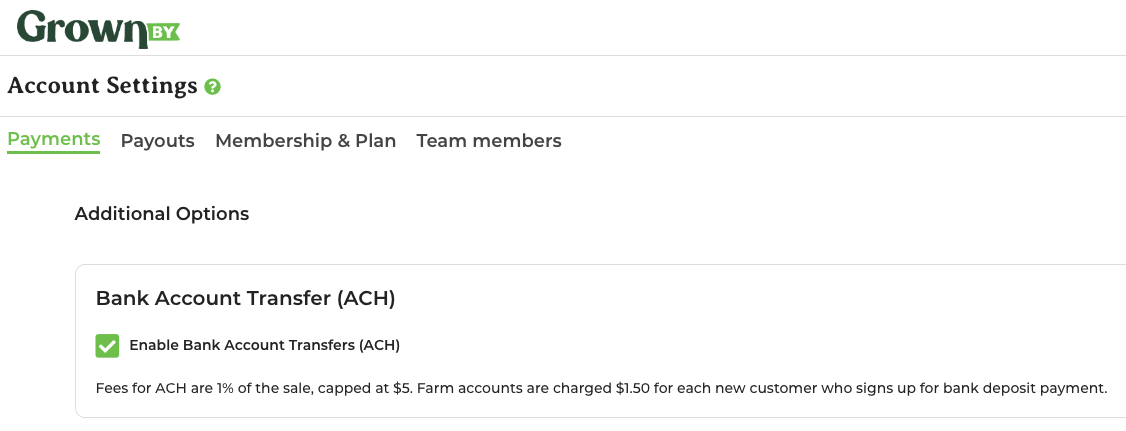
Once enabled, the ACH option will appear at checkout for shoppers. The feature starts turned off on your account by default.
How Shoppers Use ACH Payments
- Select ACH at Checkout:
- At checkout, shoppers will see the ACH payment option.
- Enter Bank Details:
- Shoppers will need to enter their bank account details, routing and account number.
By enabling ACH payments, you can offer your customers a lower-fee payment option that is as convenient as credit card payments.
ACH fees in the Invoices Export
ACH fees appear in separate columns in the Invoices Exports: Stripe ACH Fee for Stripe-processed ACH payments, and Fortis ACH Fee for Fortis-processed ACH payments. The one-time $1.50 ACH set-up fee is currently included in the co-op fee for that same invoice.