
This article is about community location/site fees for share/subscription products.
Farms that offer multiple pickup sites sometimes want to charge a site-specific fee (for example, to cover host site costs, staffing, and/or delivery and distribution logistics). Community pick-up locations do not currently support location-based fees. These are sometimes referred to as membership or site fees.
This article describes several options for farms who need to charge site fees to their customers.
Option 1: Charge a Flat Membership or Site Fee attached to the Share Products
Some farms charge a flat, one-time fee for the season in addition to the share price. This fee is tied to the share or subscription product and is charged once when the customer signs up.
How This Option Works
- Create a fee under Account Settings > Taxes & Fees (for example, "CSA Membership Fee" or "Site Fee").
- Link the fee to your CSA Share Product so it is automatically added when customers purchase a share.
- To reduce clutter in your shop, fulfillment reports, and other reporting, you may choose to use templates. Templates let you set up different child share products with unique fees attached to each.
When to Use This Option
This option works best if:
- You want to charge a single flat fee for the season
- You do not need the fee to change based on missed pickups, vacation weeks, or cancellations
- You want a simple, low-administration solution
Limitations
- The fee does not prorate if a customer joins late.
- The fee does not adjust if a customer claims vacation weeks or if pickups are canceled.
- Refunds must be handled manually if needed.
Because the fee is not tied to individual distributions, it behaves differently from delivery zone fees and site fees added to pricing (detailed below in Options 2 and 3).
Option 2: Create Separate Share Products for Each Location
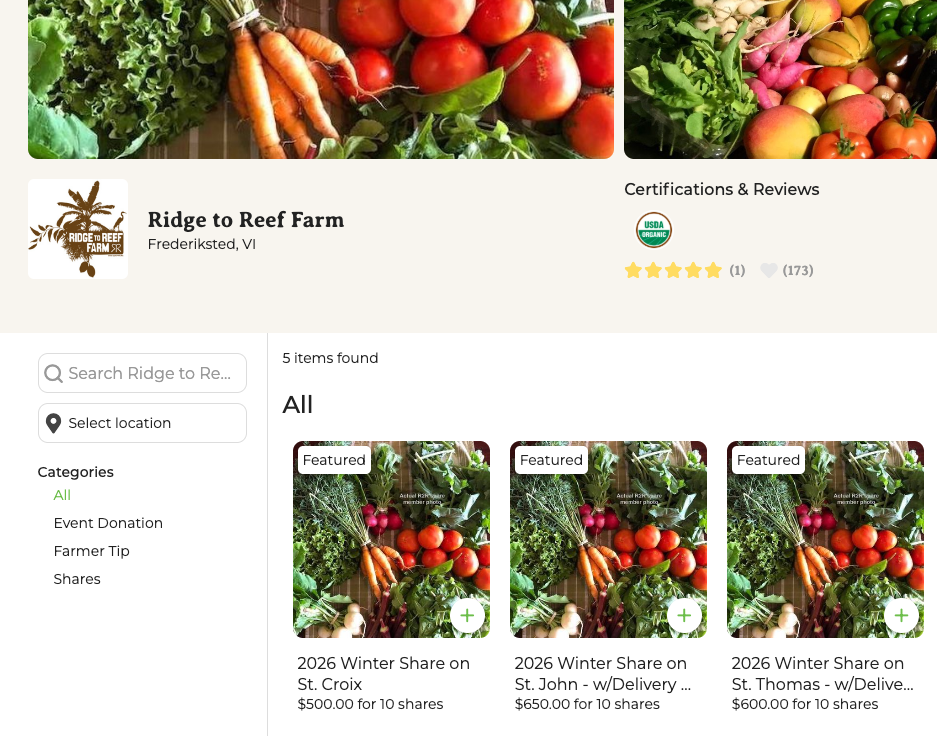
Another method is to create separate share products for each location-based fee price group and price them accordingly.
This works best if:
- You offer a small number of share sizes and frequencies
- You serve only a few locations or can group these locations for fee purposes
- You want customers to see location-specific pricing directly in your shop
Limitations:
- The number of products grows quickly (for example: 4 share sizes x 3 frequencies x multiple locations); Your shop can become cluttered and confusing for customers
- Managing and updating pricing across many products takes time
Below is an example of a shop set-up with products for each price group. This farm offers one share size on 3 different islands which have different logistical requirements. The farm has multiple drop sites on each island.
Option 3: Build Site Fees Into Share Pricing and Use Promo Codes
For farms with many share products, you can build site fees into all share prices, then discount those fees for customers who are not subject to them.
Step 1: Price All Shares to Include Site Fees
- Add the Site fee into the per distribution price of each share product.
Step 2: Create Promotional Codes for Customers Who Won't be Charged Fees
Create separate coupons and promo codes for each subscription frequency you offer (weekly, biweekly, monthly)
Each coupon should discount the site fee multiplied by the number of distributions in the share for that frequency.
Step 3: Apply Promo Codes at Checkout or via Order Editing
Customers can:
- Enter the promo code themselves at checkout, or
- You can apply the promo code using Order Editing before finalizing the order.
If a customer enters the wrong code or forgets to enter one, you can correct it before fulfillment by editing their order.
How to Choose the Right Approach for Your Farm
Administrative Considerations
Using promo codes adds extra steps:
- Customers must enter codes correctly at checkout or
- Farmers must apply codes using Order Editing
The more customers who will need promo codes, the more admin work this may be for you.
Additional Considerations
- Promo codes do not automatically prorate for late-season signups. You will need to adjust discounts manually if customers join after the season starts.
- Customers may forget to enter promo codes—Order Editing can help correct this before fulfillment.
- Fees included in share pricing affect the amount assigned for vacation week credits (customers receive the price/distribution added to their farm credit balance when they claim vacation).