
Sometimes a customer signs up for a CSA share but knows ahead of time that there are some distributions they won't receive—eg, they're traveling at the start of the season. If those shares haven't been paid for yet, you'll want your revenue numbers to reflect that you're delivering fewer boxes overall.
Recommended approach: Adjust upcoming unpaid invoices
If the customer is on a weekly or monthly payment plan and hasn't paid for those skipped shares yet, we recommend adjusting future unpaid invoices down by the value of the shares they won't receive.
This helps your CSA revenue reports match what you actually delivered, not just what was originally scheduled.
- If it matters when the revenue reduction shows up in your books, adjust invoices closest to the skipped pickup dates.
- If timing doesn't matter, you can adjust any upcoming unpaid invoices.
Learn more about viewing and editing invoices in The Invoices Tab on GrownBy.
How to adjust an unpaid invoice
Go to your Farmer Dashboard.
- Click Customers.
- Find the customer and click to see their Customer Detail Page.
- Scroll to the Orders Section and expand it. Find the Order in question and then click Manage Order.
- Scroll to the bottom to view related Invoices. Click on the invoice you want to Adjust.
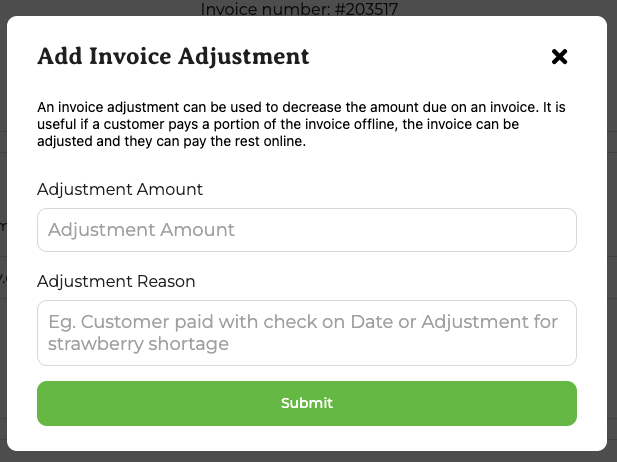
- Click Add Adjustment.
- In the Adjustment Amount field, enter the amount to reduce the invoice by (the value of the skipped shares). You may have to adjust multiple invoices depending on the number of shares skipped and the amounts of the installment invoices.
- Enter an Adjustment Reason (required; 5–100 characters).
- Click Submit.
The Add Invoice Adjustment pop-up looks like this:
Other options and things to consider
Vacation weeks and farm credit
- Claiming a vacation week issues farm credit, which is best when a customer has already paid for a pickup they won't receive.
- Learn more about farm credit in Farm Credit on GrownBy.
Refunds
- Refunds apply to payments that have already been collected.
- Future unpaid CSA distributions can't be refunded because they haven't been paid yet.